- 易迪拓培训,专注于微波、射频、天线设计工程师的培养

CST2013: ADS Simplification
录入:edatop.com 点击:
Modeling: Exchange  Import/Export3D FilesADS Model Open
This dialog box enables you to smooth segmented circles and arcs or to remove tiny edges from the ADS model.
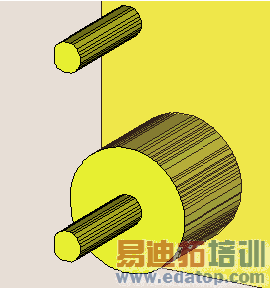
The two pictures below are show a small part from an ADS import. The left one is shown without simplification and the right one is shown with default simplification settings:
|
|

Use simplification.
Selecting or de-selecting this checkbox identifies whether the ADS model is imported with or without the specified settings below.
Circle/arc conversion frame
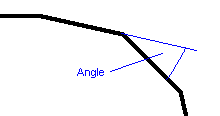
Arc resolution (degree)
| The maximum angle in degrees between two adjacent segments. All smaller angles will be considered to be converted to arcs. The angle is only used for arcs and not for circles. |
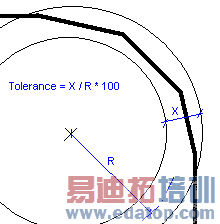
Radius tolerance (percent)
| The maximum deviation in percent of the distance between a segment endpoint and the current definition of the circle center point. The tolerance is used for circles and arcs. |
Small edge removal frame
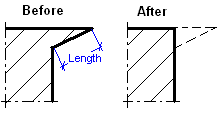
Minimum edge length
| Edges smaller than the defined length will be removed; this may be used to remove tiny fragments. |
OK
Pressing this button will start the import.
Help
Shows this help text.
CST微波工作室培训课程套装,专家讲解,视频教学,帮助您快速学习掌握CST设计应用
上一篇:CST2013: Add Absolute Fixpoint
下一篇:CST2013: Add Intermediate Fixpoints
CST培训课程推荐详情>>
 最全面、最专业的CST微波工作室视频培训课程,可以帮助您从零开始,全面系统学习CST的设计应用【More..】
频道总排行
- CST2013: Mesh Problem Handling
- CST2013: Field Source Overview
- CST2013: Discrete Port Overview
- CST2013: Sources and Boundary C
- CST2013: Multipin Port Overview
- CST2013: Farfield Overview
- CST2013: Waveguide Port
- CST2013: Frequency Domain Solver
- CST2013: Import ODB++ Files
- CST2013: Settings for Floquet B