- 易迪拓培训,专注于微波、射频、天线设计工程师的培养

HFSS15: Using Families Tab for Reports
录入:edatop.com 点击:
The Families tab of the Report dialog provides a way to select from valid solutions for sweeps where a simulation has multiple variables defined and solutions exist for multiple variable values (for example, for a parametric sweep or re-running an analysis with a different variable value). If no variables are defined, or none have solutions for different values, 0 families will be available. If so, the variables other than the X (Primary sweep), are listed under the Families tab with columns for the variable, the solution value (which may be All, Nominal, or a Specific value), and an Edit column with an ellipsis [...] button. Families gives the number available. If an existing variable is specified as Nominal, only that value is currently available. You can set any solved variables as Nominal, All, or select from values provided for Available solutions.

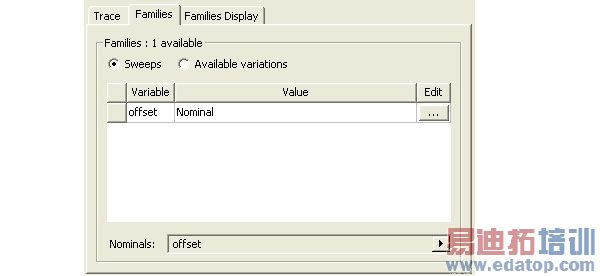
When you select a variable with multiple solved values, a trace for each solved value appears in the Report, with the variable value appended to the trace name in the Report legend.

When families are available, you can make selections for the following:
1. Select the Sweeps radio button (the default) to list the swept variables you can select or the Available variations button to list and select variation values for which solutions exist.
2. With the Sweeps radio button selected, click the ellipsis [...] button to display a list of variable values for a particular variable. If many variables exist, you can use a scroll bar to navigate the list.
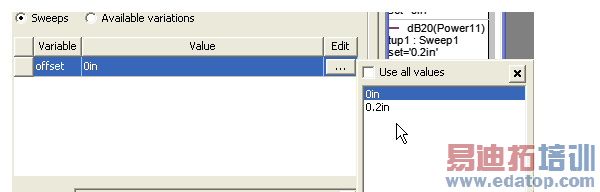
• To select all values, click the checkbox for Use all values. This writes “All” in the value field for that variable. You can also select individual values by clicking on them.
• To select a range of values, hold down the shift key, and click again.
• To select intermittent additional values, hold the CTRL key and click additional. The values you select are highlighted in the list, and are also listed in the Values column for that variable.
• To select all, use the Select All button. This highlights the complete list, as well as listing all values for the variable in the Value field.

• To clear the selections, use the Clear All button.
.Select the Available variations radio button to list the choices that derive from variable combination.
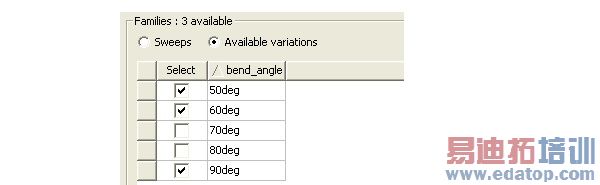
a. To select individual variations, check the select box.
b. To check or clear all variations at once, click the Select button at the top of the column.
c. To invert the list order, click the triangle beside the variable name.
The Families Display tab has three radio button selections.
a. All Families
b. Statistics which lists a table statistical functions that you can select to apply to the plot. The functions include Min, Max, Avg, Mean, Variance, Std Dev, and Sum. You can use the Select checkboxes or the Select All and Clear All button.
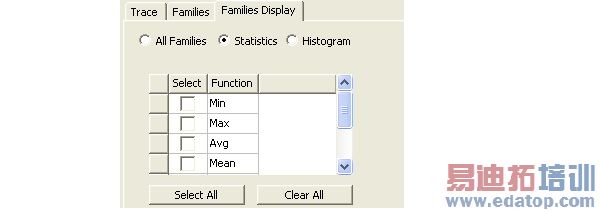
c. Histogram which lets you select the number of bins to use for a histogram plot, and the sampling frequency to use.

Related Topics
Creating Reports
Modifying Reports
Modifying the Background Properties of a Report
Modifying the Legend in a Report
Creating Custom Report Templates
Working with Traces
Editing the Display Properties of Traces
Discarding Report Values Below a Specified Threshold
Add Trace Characteristics
Adding Data Markers to Traces
HFSS 学习培训课程套装,专家讲解,视频教学,帮助您全面系统地学习掌握HFSS
上一篇:Using the Password Manager to Control Access to Resources
下一篇:Using Valid Operators for Expressions

