- 易迪拓培训,专注于微波、射频、天线设计工程师的培养

HFSS15: Setting the Temperature of Objects
录入:edatop.com 点击:
To set the temperature of objects and to Enable Feedback for use in Workbench:
1. Use the HFSS or HFSS-IE>Set Object Temperature command to display the Temperature of Objects dialog. You can also right-click on the Project and select from the shortcut menu.
This dialog includes a table of the objects in the design. The first column lists the object name, then the material, then a checkbox to show whether that object has temperature dependent features, and then columns for Temperature and unit.

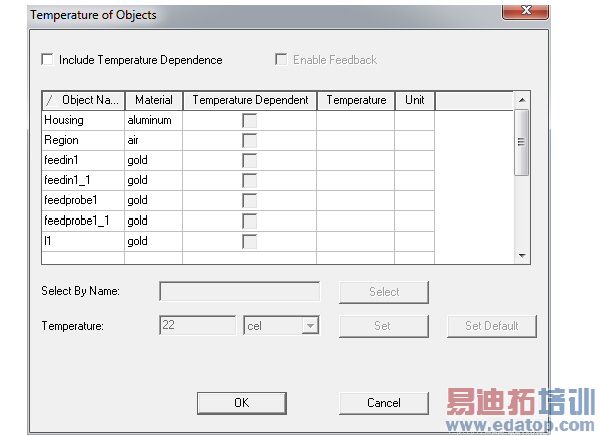
2. To enable the editing features, check Include Temperature Dependence.
This makes the table objects selectable. The headers for the Object Name column and the Material column include sort direction arrows. You can invert the sort direction in each column by clicking the header. If the list is longer than the display, you can use a scroll bar on the right of the table.
With the dialog enabled, you can use the Select by name field. Enter the name of the object you want and click Select.
Selected objects are highlighted. You can make multiple selections.
3. To set the temperature for a selected object or objects, type the value or an existing variable name in the text field.
4. Select the units from the drop down menu.
5. Click Set to apply the value to the selected objects, or click Set Default to make the specified values the default.
If you click Set Default, the row for the selected objects display the Temperature value and units.
6. To edit the material for an object, when the dialog is enabled, you can click on the material for the row, and display a drop down menu listing the material and an Edit... button.
Click the edit button to display the Materials dialog.
7. The Enable Feedback checkbox appears when HFSS is used with the ANSYS Workbench. If checked, you can perform thermal static and transient analysis based on an HFSS high frequency solution.
8. To close the dialog and accept the changes, click OK.
HFSS 学习培训课程套装,专家讲解,视频教学,帮助您全面系统地学习掌握HFSS
上一篇:Setting the Minimum Number of Passes
下一篇:Setting the Number of Modes

