- 易迪拓培训,专注于微波、射频、天线设计工程师的培养

HFSS15: Segmented Objects
录入:edatop.com 点击:
To create segmented circles, ellipses, and cylinders use the Number of Segments parameter on the Command Tab of the Properties dialog as shown below. To convert an object from true surface to segmented, do the following:
1. Select the circle, ellipse, or cylinder in the modeler window or in the history tree.
2. In the command tab of the properties window (shown docked below), change the Number of Segments to an integer value of three or greater and press Enter.

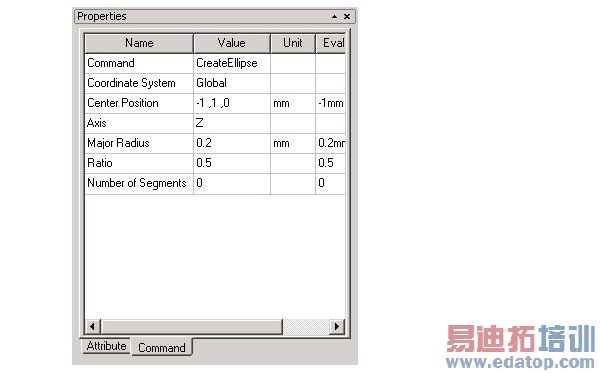
Values of 1 and 2 are not valid values for the circle, ellipse, or cylinder command and will cause an error.
HFSS 学习培训课程套装,专家讲解,视频教学,帮助您全面系统地学习掌握HFSS
上一篇:Scaling Sources and Setting Delays for HFSS Transient Network
下一篇:Scripting Using Iron Python: Putting it all Together

