- 易迪拓培训,专注于微波、射频、天线设计工程师的培养

HFSS15: Set Renormalizing Impedance for Terminals
录入:edatop.com 点击:
The setup panel for each terminal includes its post processing renormalizing impedance. You can set this value either for all excitations, or for a specific port. If a design includes at least one wave port, the setup panel also includes the radio buttons Do Not Renormalize Any Terminals, or Renormalize All Terminals’ Spectral Domain Data.
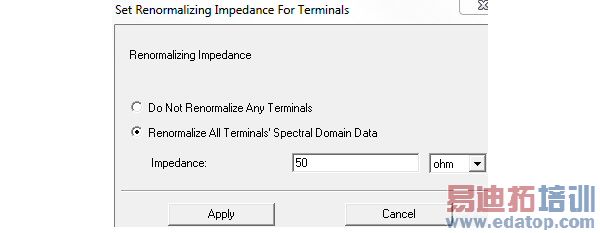
To set the renormalizing impedance for all excitations:
1. Right click Excitations in the Project tree and select Set Terminal Renormalizing Impedances.
The Set Renormalizing Impedance for Terminals dialog box appears.
2. In the field for Impedance, set the value, and select the units from the pull down.
This value can be a variable. This variable can be dependent on the frequency, which allows use of a dataset for frequency dependent impedance.
3. Click the Apply button to close the dialog and apply the change.
To Set the Reference for All terminals on a Port:
1. Right click the port icon in the Project tree and click Set Terminal Renormalizing Impedances.
The Set Renormalizing Impedance for Terminals dialog appears. It differs from the related command for all excitations by specifying that the Renormalizing Impedance is for terminals on the selected port.
2. In the field for Impedance, set the value, and select the units from the pull down.
This value can be a variable. This variable can be dependent on the frequency, which allows use of a dataset for frequency dependent impedance.
3. Click the Apply button to assign the impedance value.
Note: For more information, see Scaling a Source Magnitude and Phase.
You can also set the Terminal Reference Impedance on a port by selecting the port and editing the value in the Properties dialog.
In designs with at least one wave port, where you want to view un-renormalized Zo impedance and/or the corresponding S parameters in either the Matrix data or in a report, you can select the Do Not Renormalize Any Terminals radio button.
HFSS 学习培训课程套装,专家讲解,视频教学,帮助您全面系统地学习掌握HFSS
上一篇:Select the MPI Vendor for HFSS
下一篇:Removing an Orientation

