- 易迪拓培训,专注于微波、射频、天线设计工程师的培养

HFSS15: Project Sheet Object
录入:edatop.com 点击:
Use the Modeler>Surface >Project Sheet command to apply a selected planar sheet object to a suitable 3D object. This permits easy modeling of thin conformal deposits. (The Wrap Sheet and Imprint Projection commands are not suitable for this use.) For modeling conformal deposits, after using Project Sheet, you use Modeler>Surfaces>Thicken Sheet.
To use the Project Sheet command you must select one planar sheet and at least one solid body. If you select multiple solids, the sheet is project on all bodies as if they have been united. After the commend executes, a new sheet that lies on the surface of the selected bodies is created. The solid bodies are not changed.

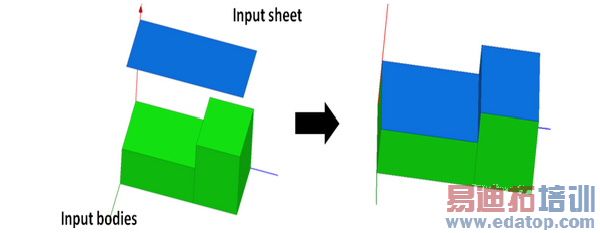
Faces that are hidden from the sheet being projected are not covered, due to the projected sheet.
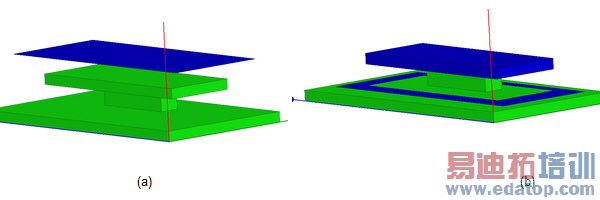
Only vertical faces (or faces parallel to the projection direction) that lie completely within the projection of the sheet will be covered by the projected sheet. Vertical faces that lie on the boundary of the projection are not covered.
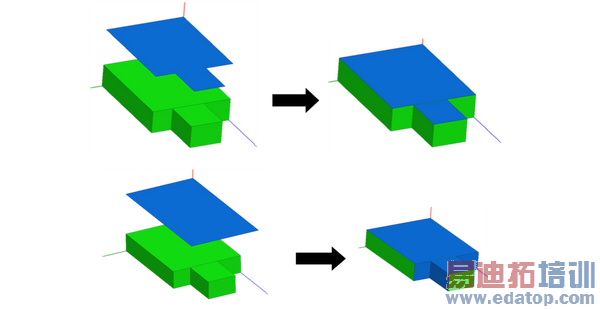
If the sheet cross-section exactly matches the body cross-section, no vertical faces are covered. If the projected sheet exceeds the cross-section of solids, faces that lie with in the sheet projection are covered.
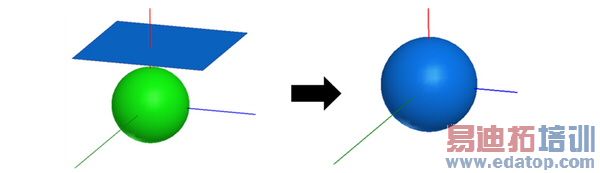
If a surface like a cylinder or sphere lies completely within the sheet projection, the entire surface will be covered.
To Project a Sheet:
1. Select a planar sheet object and one or more appropriate solid objects.
2. Click Modeler>Surface>Project Sheet.
After you perform Project Sheet, the History tree shows the Project Sheet command and the create command for the imprinted object. If you select the Project Sheet command in the History tree, you can suppress the command via the Properties window. If you select the Create <object> icon for the object, you can edit the properties of that object. The changes applied to the object carry over to the imprinting.
For modeling conformal deposits, you must also use Thicken Sheet.
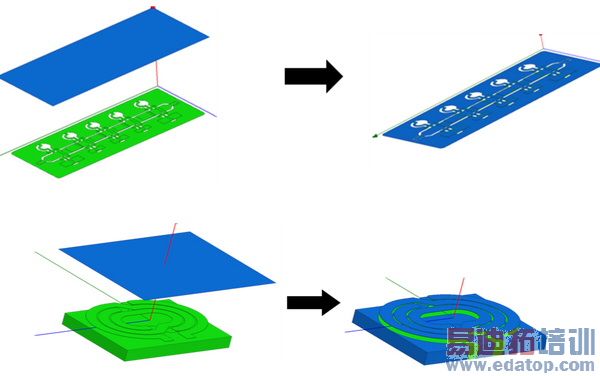
Other examples of Project Sheet on complex models are show in the following figure.
Related Topics
Thicken Sheet
HFSS 学习培训课程套装,专家讲解,视频教学,帮助您全面系统地学习掌握HFSS
上一篇:Power Normalizations
下一篇:Prepare the Model for Large Scale DSO Analysis

