- 易迪拓培训,专注于微波、射频、天线设计工程师的培养

HFSS15: Normal Command
录入:edatop.com 点击:
Computes the normal component of a vector quantity on a surface such as a cutplane or object surface. This is the equivalent of taking the dot product of the quantity with the surface’s unit normal vector:

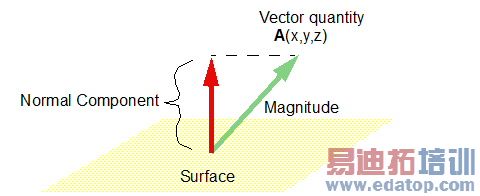
To take the normal of a vector:
1. Load a vector quantity into the top register.
2. Load a surface into the top register using the Geometry/Surface command.
3. Click Normal.
Note | Because surface normals of sheets are not well defined the fields calculator can produce incorrect results if an expression is evaluated on a sheet. To enforce the correct direction of the surface normal of a sheet, a faceted 3D object (such as a box) can be defined such that one of its planar faces is coincident with the sheet. Because surface normals of a valid object are always defined in an outward direction in HFSS, the fields calculator uses the surface normal of the face of the 3D object that is coincident with the sheet. |
HFSS 学习培训课程套装,专家讲解,视频教学,帮助您全面系统地学习掌握HFSS
上一篇:One: Healing during geometry import
下一篇:Opening a Field Overlay Plot

