- 易迪拓培训,专注于微波、射频、天线设计工程师的培养

HFSS15: Manually Assigning a Wave Port for Terminal Solutions
录入:edatop.com 点击:
1. Select the object face to which you want to assign the port and click HFSS>Excitations>Assign>Wave Port.

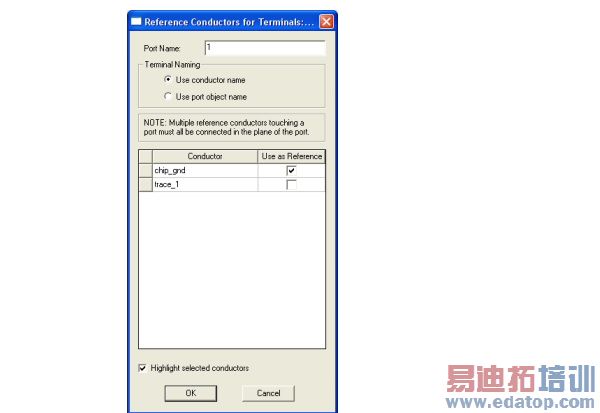
2. Specify the convention for terminal naming as "Use conductor Name" or "Use port object name."
3. Specify which conductors to Use as Reference. By option you can check Highlight selected conductors.
4. Clicking OK adds the Wave port and terminal to the Project tree.
5. Double click the wave port in the Project tree to display the Properties window for the wave port. Select the Post Processing tab.
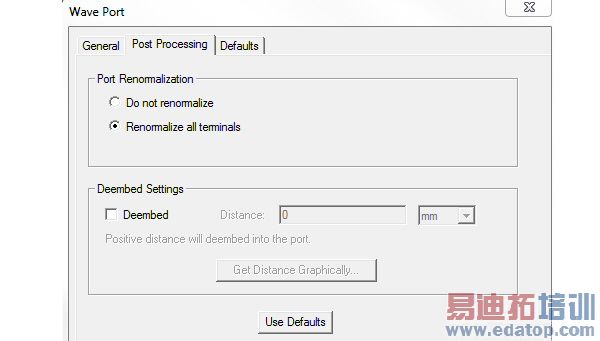
Values here affect S-Parameters only.
The Port Renormalization choices include:
• Do Not Renormalize (the default). Selecting this disables the Impedance fields for the port and terminals.
• Renormalize All Terminals. The default impedance for re-normalization of each port is 50 ohms. To specify a different impedance, you must open the Properties for the terminal and specify a value in the Terminal Renormalizing Impedance field.
If you want to enter a complex impedance, enter it in the following form:
<re> + <im>j
• If there are multiple modes, Renormalizing Impedance for Specific Terminals is enabled. Click this to enable the Edit Terminal Impedances button. This opens a editable table with the impedances for each terminal.
6. To deembed the port, select Deembed, and then type the deembedding distance to add. You can assign a variable as this value. After you enter the value, a blue arrow depicts the embedding distance in the graphics window when the port is selected.
Note | A positive distance value will de-embed into the port. A negative distance value will de-embed out of the port. |
• Alternatively, click Get Distance Graphically to draw a line with a length representing the de-embed distance. After you draw the line in the 3D window, the Distance field shows the specified distance. You can subsequently edit this value.
7. For HFSS Transient solutions, you can designate a port as Active or Passive.
HFSS 学习培训课程套装,专家讲解,视频教学,帮助您全面系统地学习掌握HFSS
上一篇:Material Tensors Applied at PML Boundaries
下一篇:Lumped Ports Theory

