- 易迪拓培训,专注于微波、射频、天线设计工程师的培养

HFSS15: Drawing an Equation-Based Surface
录入:edatop.com 点击:
Any surface that can be described by an equation in three dimensions can be drawn.


1. Click Draw>Equation Based Surface  .
.
The Equation Based Surface dialog box opens.
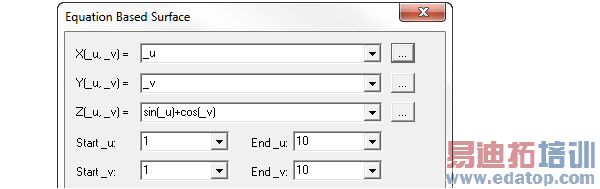
2. Type equations for X(_u, _v), Y(_u, _v), and Z(_u, _v).
You can also define an equation by doing the following:
Click the ... button.
The Edit Equation dialog box appears.

e. Do one or more of the following to define the equation:
Type a numerical value, variable, or expression directly in the text box.
Build an equation for X(u, v), Y(u, v), or Z(u, v), by selecting function, operator, and quantity to insert from the corresponding pull-down lists.
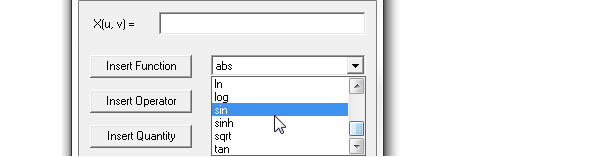
Select the respecting Insert Quantity, Operator or Quantity buttons to place the selections on the equation fields. An inserted Quanity goes inside a currently inserted Function.
You can also type operators and values to build complexequations.

f. When you are finished defining the equation, click OK to close the Edit Equation dialog box and return to the Equation Based Surface dialog box.
• Any unitless value input in equation based curve is taken as model units. For example, for Y(_t) = 1, the y value is taken as 1 model units (say mm). If a value has units, then it is converted to model units and used. For example, if we specify Y(_t) = 1cm, then y value will be correctly taken as 10mm.
• While parsing expressions, equation based curves convert each variable separately to model units and assume that the resulting expression is in model units.
• Equation based curves depend on the variable value library to correctly evaluate the units of expression.
3. Specify start values for the Start_u and Start_v fields.
Select end values for End_u and End_v fields.

4. Click OK on the Properties dialog box.
The surface is drawn in the Modeler window. The History tree contains the Equation Surface object and the command properties.

If the Modeler option for editing properties of new primitives is checked, the Properties dialog box appears, enabling you to modify the object’s attributes.
HFSS 学习培训课程套装,专家讲解,视频教学,帮助您全面系统地学习掌握HFSS
上一篇:Distributed Memory Solutions with HFSS-IE
下一篇:Drawing a Bondwire

