- 易迪拓培训,专注于微波、射频、天线设计工程师的培养

HFSS15: Custom Keyboard Shortcuts
录入:edatop.com 点击:
Click Tools>Keyboard Shortcuts to display a dialog that lets you view existing assignments, create new shortcuts, save and load assignment files.

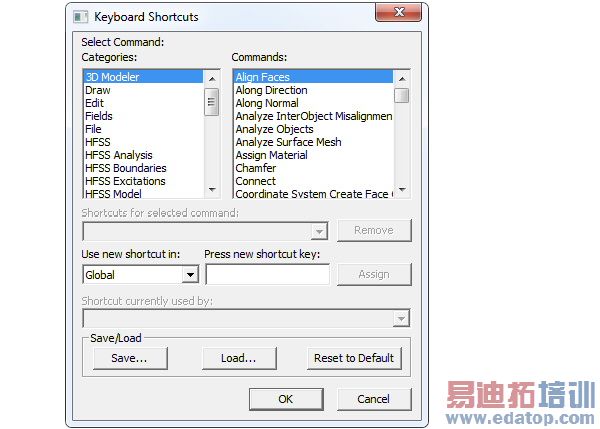
Selecting a Command category lists the available commands for that category. If the command has an assigned shortcut, it is displayed on the Shortcuts for the selected command field. You can use the Remove button to disable the shortcut for the selected command. If the selected command does not have an assigned shortcut, the Shortcuts for selected command field and the Remove button are greyed out.
To create a new shortcut key:
1. Select the Category and Command.
2. If you want disable a current assignment for the selected command, click Remove.
3. To assign a keyboard shortcut, place the cursor in the Press new shortcut key field.
The field displays the keystrokes you make. When you have made keystrokes, the dialog enables the Assign button. If you combine keystrokes these are displayed with a “+” between them. For example, Ctrl + p or Alt +o.
4. The Use new shortcut in field displays Global by default, which means that the shortcut will apply to all applicable contexts, including HFSS and HFSS-IE. If a limited context exists, the menu will offer a selection.
5. When you have made the assignments you want to make, You can save the assignments to a named file.
Clicking the Save... button displays a browser window that lets you navigate the file structure and assign a name, using an aks suffix for ANSYS Keyboard Shortcut file.
Buttons on the browser window let you designate the file location as Use Path, Personallib, Syslib, UserLib, or Project folder.
If you have an existing aks file, you can use the Load... button to display a browser window to locate the desired file.
6. You can OK the current settings, or Reset to Default.
HFSS 学习培训课程套装,专家讲解,视频教学,帮助您全面系统地学习掌握HFSS
上一篇:Deembedding Parasitic Lumped Port Effects
下一篇:Defining Anisotropic Relative Permittivity Tensors

