- 易迪拓培训,专注于微波、射频、天线设计工程师的培养

HFSS15: Corporate Feed
录入:edatop.com 点击:
Description - A microstrip 8 way corporate feed. The model was originally created in Ansoft Designer. Export to HFSS was used to create this project. It is a Driven Terminal design.

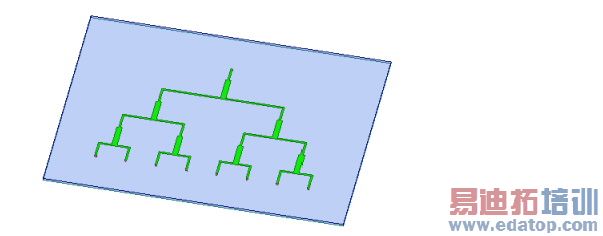
Model - The traces are defined as 2D objects with a finite conductivity boundary of copper. The sources are all lumped ports with a 50 Ohm impedance. There is a surrounding air box with a radiation boundary on the top and sides.
Setup - Adapt at 7.5 GHz and use Mixed Order for the Order of Basis function.
Note | To view a port or boundary, select the desired item in the Project Tree. It is highlighted in the Model window and the properties will be displayed. Selecting an object in the History tree will also display its properties. |
Corporate Feed Post Processing
After solving, you can view solution data by right-clicking on the Setup and selecting Profile to display the Solution dialog. You also view the Solution tabs for Convergence, Matrix Data, and Mesh Statistics.

HFSS 学习培训课程套装,专家讲解,视频教学,帮助您全面系统地学习掌握HFSS
上一篇:Converting VBScript Function calls to IronPython Syntax
下一篇:Creating 3D Polar Plots

