- 易迪拓培训,专注于微波、射频、天线设计工程师的培养

HFSS15: Assigning Infinite Ground Plane Boundaries in HFSS-IE
录入:edatop.com 点击:
An HFSS-IE design can contain an Infinite Ground Plane boundary aligned with the global XY plane. The Infinite Ground Plane will not be assigned to any geometry, since it will often exist in a location that does not have an appropriate face or sheet for assignment.
To assign an infinite ground plane geometry in HFSS-IE:
1. With no objects selected, right-click on Boundaries in the Project tree, and select Assign>Infinite Ground Plane to display the Infinite Ground Plane dialog.

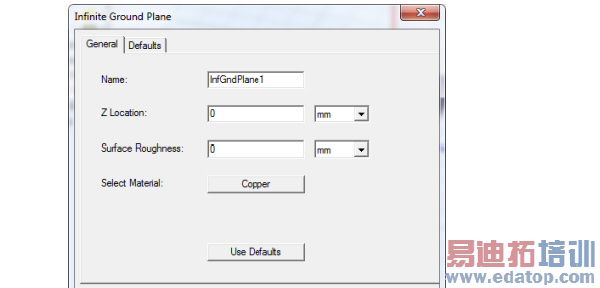
2. You can accept the default name, or specify one.
3. Specify the Z location and the units.
4. Set the surface roughness and units.
5. A Select Material button displays the name of the default material. To change the material, click the button to display the materials dialog.

