- 易迪拓培训,专注于微波、射频、天线设计工程师的培养

HFSS15: Create Array Command
录入:edatop.com 点击:
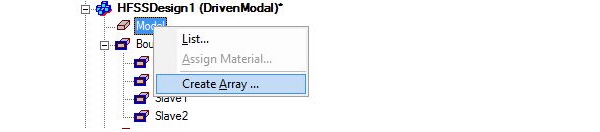
The Create Array command is enabled for Modal and Driven Terminal problems after you have assigned master and slave boundaries to your unit cell model. You can access the command in three ways: click HFSS>Model>Create Array, right-click on the Model icon in the Project tree and select Create Array from the shortcut menu, or select the unit cell in the modeler window, and select Create Array from the short-cut menu.

This displays the Regular Planar Array dialog where you specify parameters for Number of Cells, Unit Cell Position and Lattice Vectors.
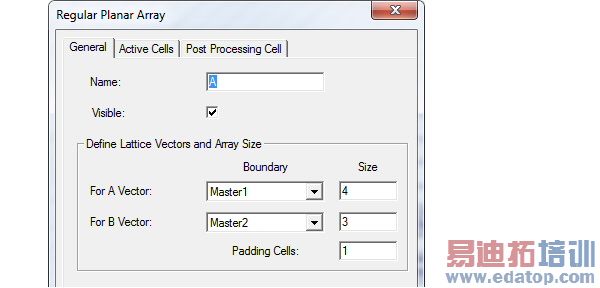
• If you have Visible enabled, you can see any changes.
• To Define Lattice Vector directions for A and B Vectors, specify the master boundary.
• To define the array size, for the A and B vectors, specify the number of cells for each row and column, respectively.
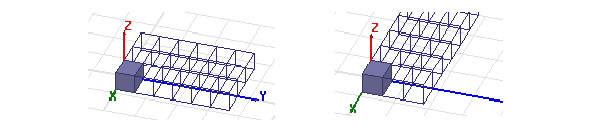
• For example, the following figure shows the results when the initial Lattice Vectors are swapped.t
To create an irregular array, select the Active Cells tab, select the radio button for Mouse makes cell as Padding
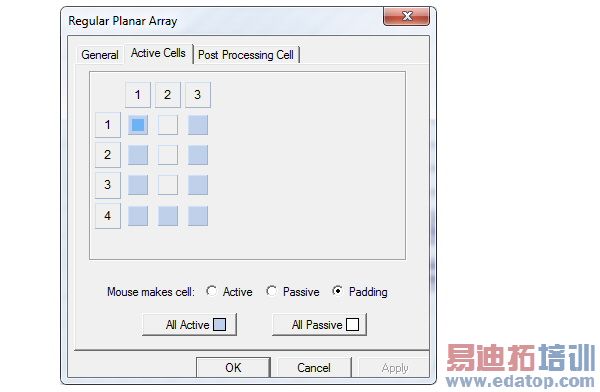
Once you have specified the parameters, the Array object appears in the Project tree under the Model. Only one Array is permitted for a model. The Create Array command is disabled if an array is defined.
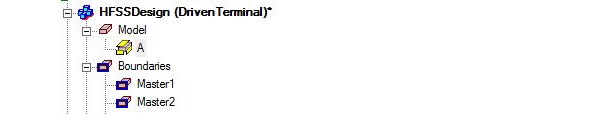
By selecting the Array icon in the Project tree, you right-click for the short cut menu.
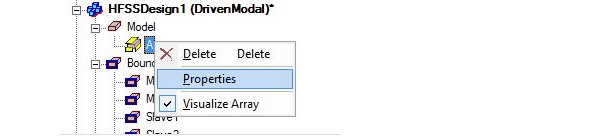
• Selecting Delete removes the array from the Model.
• Selecting Properties displays the Regular Planar Array dialog.
• Selecting Visualize Array lets you toggle the array display. A check mark indicates that the array is being displayed.
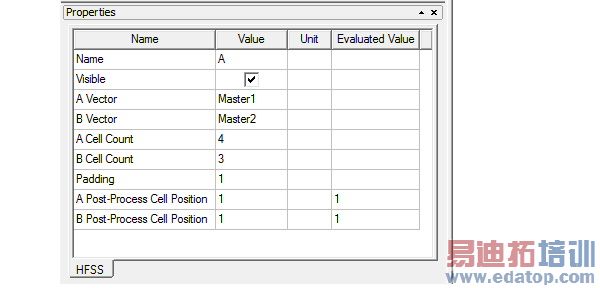
With the Array icon in the Project tree selected, if you have a docked Properties window displayed, you can see and edit Array Properties. All edits are undoable and informational messages will be posted to the Message window when design data is deleted.
Related Topics
Creating a Unit Cell for an Array
Array Visualization
Setup and Run an Array Simulation
Post Processing Array Models

