- 易迪拓培训,专注于微波、射频、天线设计工程师的培养

HFSS15: Assigning Perfect E Boundaries
录入:edatop.com 点击:
A perfect E boundary is used to represent a perfectly conducting surface in a structure.
To create a Perfect E boundary
1. Select a surface on which to assign the boundary and click HFSS or HFSS-IE>Boundaries>Assign>Pefect E to bring up the Perfect E Boundary dialog box.

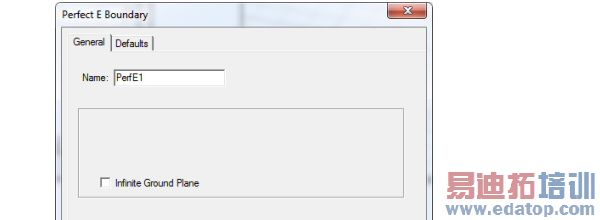
2. For HFSS projects, you can select Infinite Ground Plane if you want the surface to represent an electrically large ground plane when the radiated fields are calculated during post processing. For PEC boundaries only, multiple infinite ground planes are supported.
HFSS 学习培训课程套装,专家讲解,视频教学,帮助您全面系统地学习掌握HFSS
上一篇:Assigning Frequency Dependent Material: Enter Frequency Dependent Data Points
下一篇:Assigning Lumped Ports

