- 易迪拓培训,专注于微波、射频、天线设计工程师的培养

HFSS15: Working with the Project Manager
录入:edatop.com 点击:
The Project Manager window displays the open project’s structure, which is referred to as the project tree.
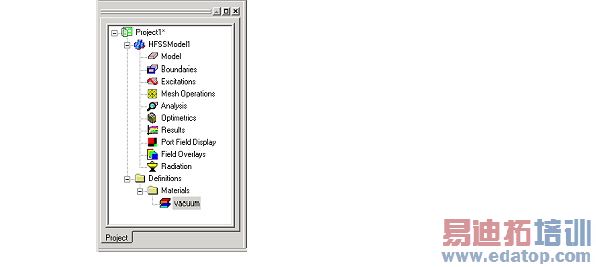
The Project Manager window displays details about all open HFSS projects. Each project ultimately includes a geometric model, its boundary conditions and material assignments, and field solution and post-processing information.
To show or hide the Project Manager window, do one of the following:
• Click View> Project Manager.
A check box appears next to this command if the Project Manager window is visible.
• Right-click in the toolbars area on the desktop, and then click Project Manager on the shortcut menu.
A check box appears next to this command if the Project Manager window is visible.
Related Topics
Working with the Project Tree
Shortcut Menus in the Project Manager Window
HFSS 学习培训课程套装,专家讲解,视频教学,帮助您全面系统地学习掌握HFSS
上一篇:Working with the Progress Window
下一篇:Working with the Project Tree

