- 易迪拓培训,专注于微波、射频、天线设计工程师的培养

HFSS15: Wrap Command
录入:edatop.com 点击:
You can use Modeler>Surface>Wrap command to wrap a sheet object around a suitable 3D object (rectangular or segmented.) The sheet object must be in contact with the 3D object. It should have smaller dimensions than the 3D object. If the sheet object does not overlap the corners of the 3D object, the wrap is straightforward, as shown in the figure. A sheet object that overlaps corners may not wrap in straightforward fashion, depending on both the angle(s) involved, and the sheet object. While it is possible, it is not recommended.

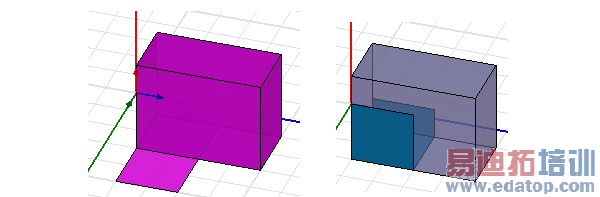
To wrap a sheet object:
1. Create a sheet in contact with an appropriate 3D object.
2. Select both objects.
3. Click Modeler>Surface>Wrap.
The sheet object wraps around the 3D object. You can select the wrapped sheet object and the 3D object separately, and assign properties separately.
If the object cannot wrap, the Message window contains a warning and description.
You can wrap multiple sheets on the same 3D object.
If you delete the 3D object, the wrapped sheet retains the form it took when wrapped.
You can use the Tools>Options>Modeler Options to automatically perform a Modeler>Boolean>Imprint command after performing a Wrap.
Related Topics
Imprinting an Object
Modeler Options: Operation Tab

