- 易迪拓培训,专注于微波、射频、天线设计工程师的培养

HFSS15: Submitting and Monitoring Jobs Using the Submit HPC Job Dialog
录入:edatop.com 点击:
In order to submit jobs using the Submit HPC Job dialog, the cluster head node hostname must be set. Selecting the Tools>Windows HPC>Select Head Node... menu item brings up the Select Head Node dialog.


You can enter the cluster head node name into the dialog. Alternatively, you can click the ellipsis [...] button to browse the network for the cluster had node.
After setting the cluster head node hostname, select Tools>Windows HPC>Submit HPC Job...
to bring up the Submit HPC Job: Tasks dialog.
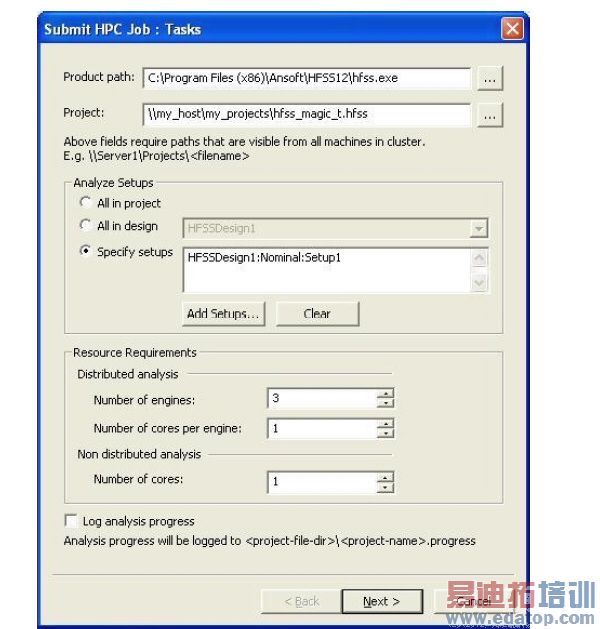
You can select which setups are analyzed in the Analyze Setups section of this dialog. There are radio buttons to select:
• All setups in the project
• All setups in a specified design: you selects the design from the dropdown list
• Specify setups: You add one or more setups using the Add Setups... dialog
If you specify multiple setups, they will be processed sequentially in the order displayed in the edit box.
The Resource Requirements group box controls how compute resources are used. The Distributed Analysis settings control resource usage for the portion of the analysis that may be distributed to different hosts. The Non-Distributed Analysis settings control the initial portion of analysis that runs before the start of any distributed analysis --this initial portion cannot be distributed to separate hosts, and must be run on a single host.
There are two Distributed Analysis settings. The Number of engines is the number of analysis engines that are started in parallel; the engines can run on separate hosts. The Number of cores per engine setting controls the degree of parallel processing within each engine; these parallel threads of execution must be on the same host. In the case of HFSS, each distributed engine represents one domain of a large model, portion of a frequency sweep analysis or portion of an Optimetrics setup analysis.
There is only one setting for the non distributed analysis because this part of the analysis must occur on a single host. The Number of cores controls the degree of parallelism used for this part of the analysis.
Check Log Analysis Progress to log analysis progress to a <projname.progress> file. A Progress file contains error/warning/info messages and progress text. Progress text is added every two seconds.
Pressing the Next button accepts the current settings, and advances to the Submit HPC Job: Properties dialog. Pressing the Cancel button dismisses the dialog without submitting the job.

